How loud it is, and how long you have.
Din reads the sound around you like a level meter and turns it into the number that matters: how long your ears can take the room - bare, or behind plugs. Tap I'm staying and it counts that number down while you stay.
iOS 26 or later · iPhone
From a level to time left.
Decibel meters show you a number and stop there. Din carries the number through - from the room, through the published exposure limits and whatever is in your ears, to the minutes you have left, counted down while you stay.
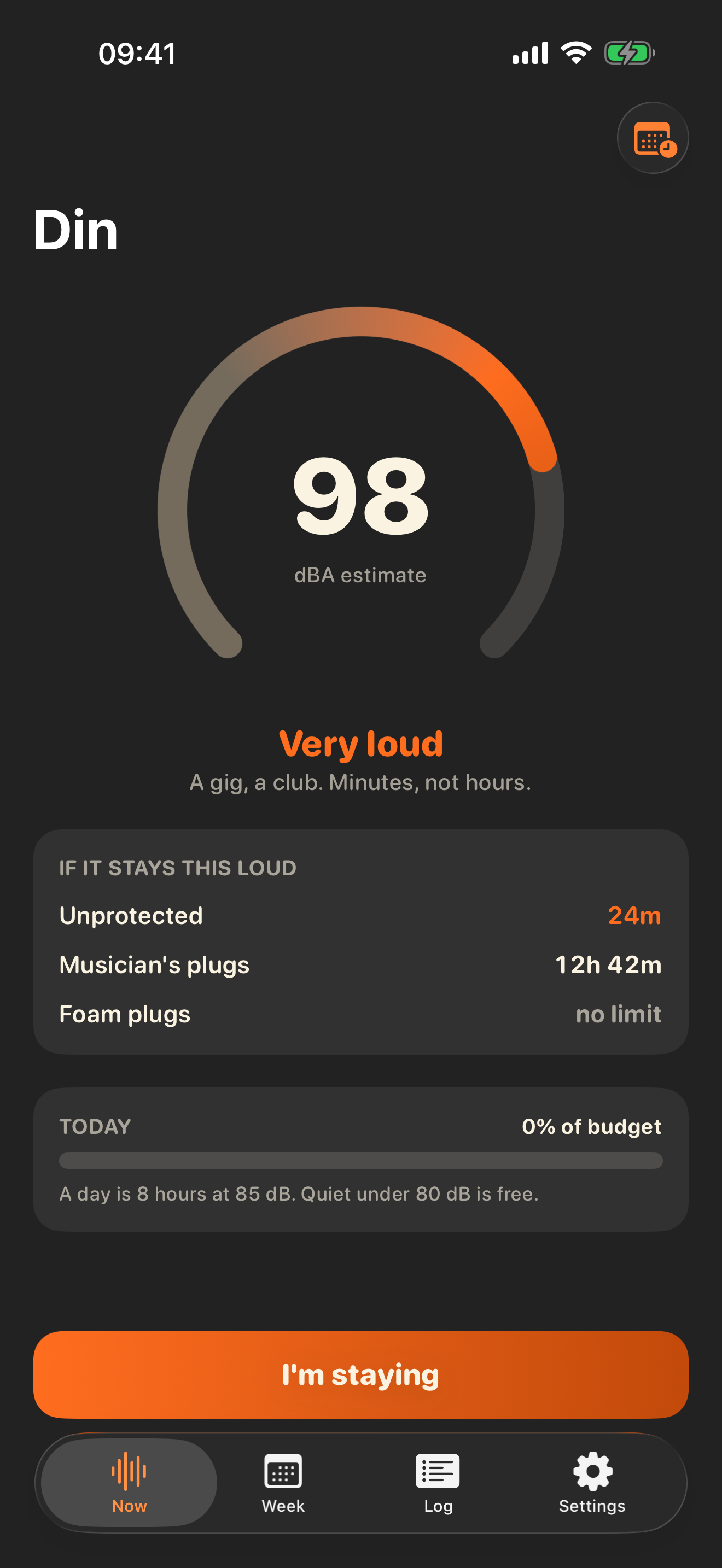
The sound around you as one big number, A-weighted like a proper meter, with a plain-words band under it: Quiet, Moderate, Loud, Very loud, Dangerous. At 98 dB the screen says a gig, a club - minutes, not hours.
Under the meter, how long ears can take the room from now - unprotected, behind musician's plugs, behind foam - side by side, so what a pair of plugs buys you is a number rather than a feeling. Any pair you add yourself joins the same table.
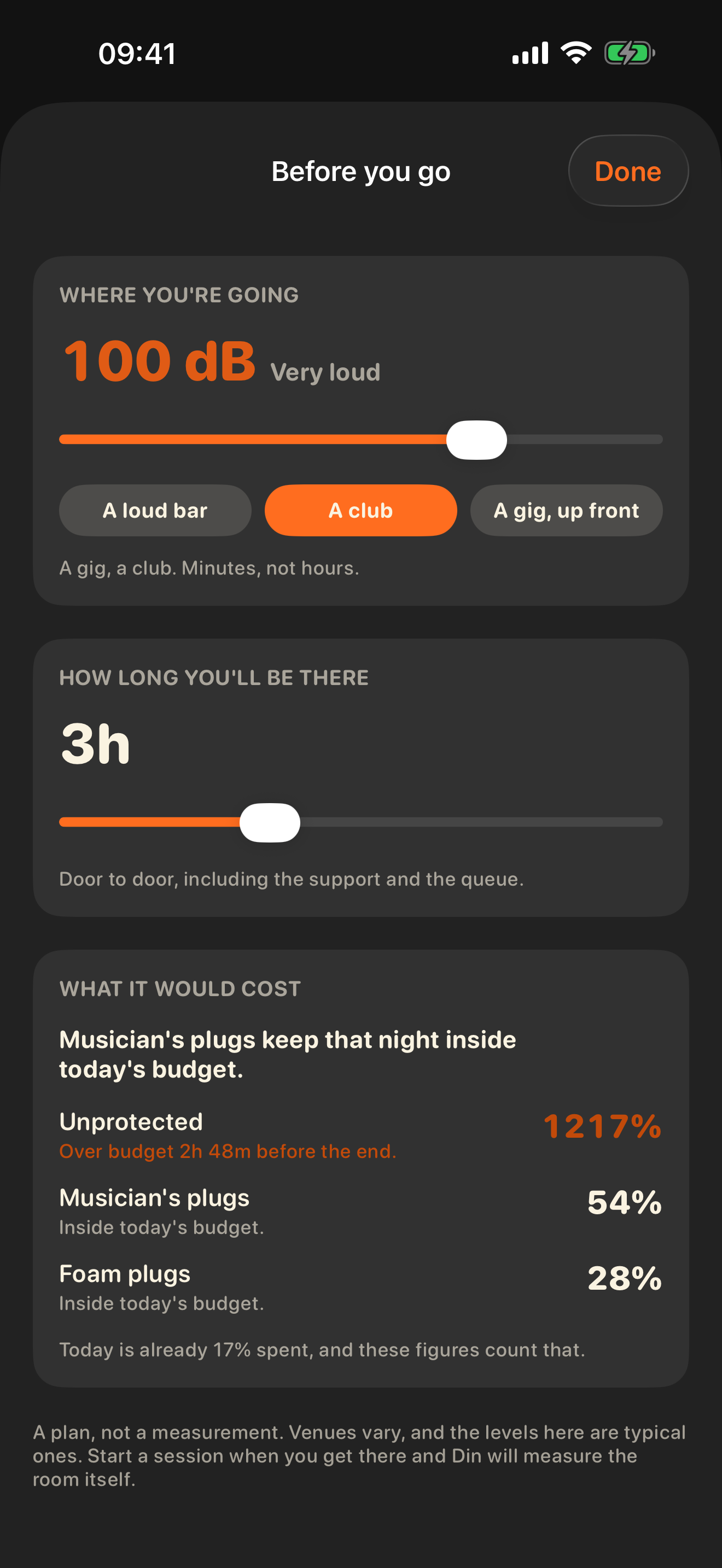
The other question: not how long you have in this room, but what a night you have not gone to yet would cost. Pick where you are going - a loud bar, a club, a gig up front, or any level from 75 to 110 dB - and how long you will be there, and Din runs the same maths forward against what today's budget has left. It names the lightest protection that keeps the night inside it, and for the ones that do not, how far from the end you would go over. Free, because whether to put plugs in your pocket is a safety decision.
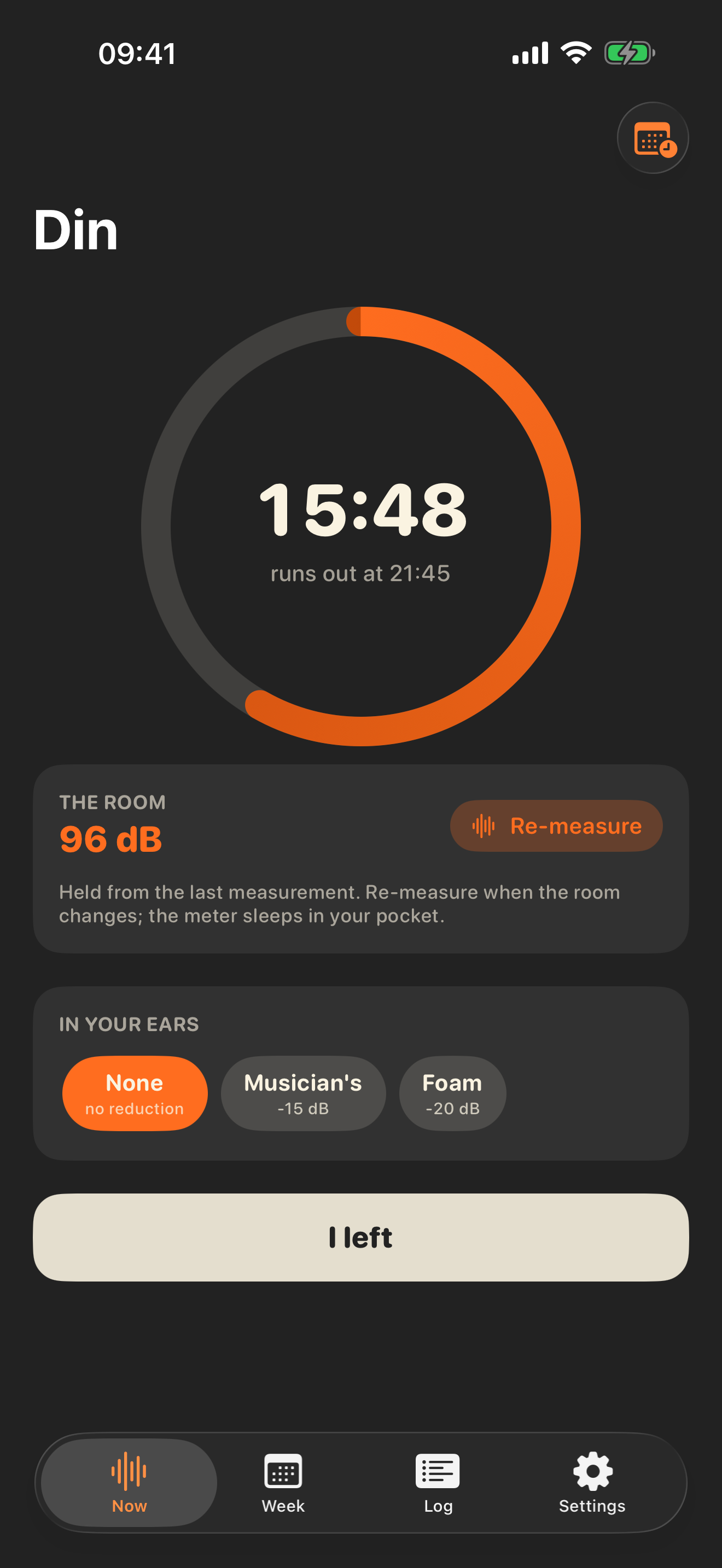
Tap I'm staying and Din holds the measured level and counts down to the moment the day's budget runs out, with a ring for how much is already spent. Tap I left and the night is saved to the log. If the allowance does run out, the screen says so and states when it resets, rather than going quiet at the moment the number stops being comfortable.
Tell Din when plugs go in or come out and re-measure when the band comes on, and the countdown follows every change. The maths never applies protection to sound you already heard without it.
Add the pairs sitting in your coat pocket by the SNR or NRR printed on the packet. Din derates the rating the way it derates its own figures - an NRR loses 7 dB for the A-weighted correction, then two thirds of what is left is counted, and nothing is credited above 25 dB. A pair rated SNR 30 comes out at exactly the 20 dB Din uses for generic foam, which is the point: the same rule, applied to your plugs instead of a category. They then appear everywhere a protection is picked.
Decline the microphone and sessions start from a typical-venue estimate instead - a loud bar, a club, a gig up front - and everything else works the same. The meter is the best way to use Din, not the price of entry.
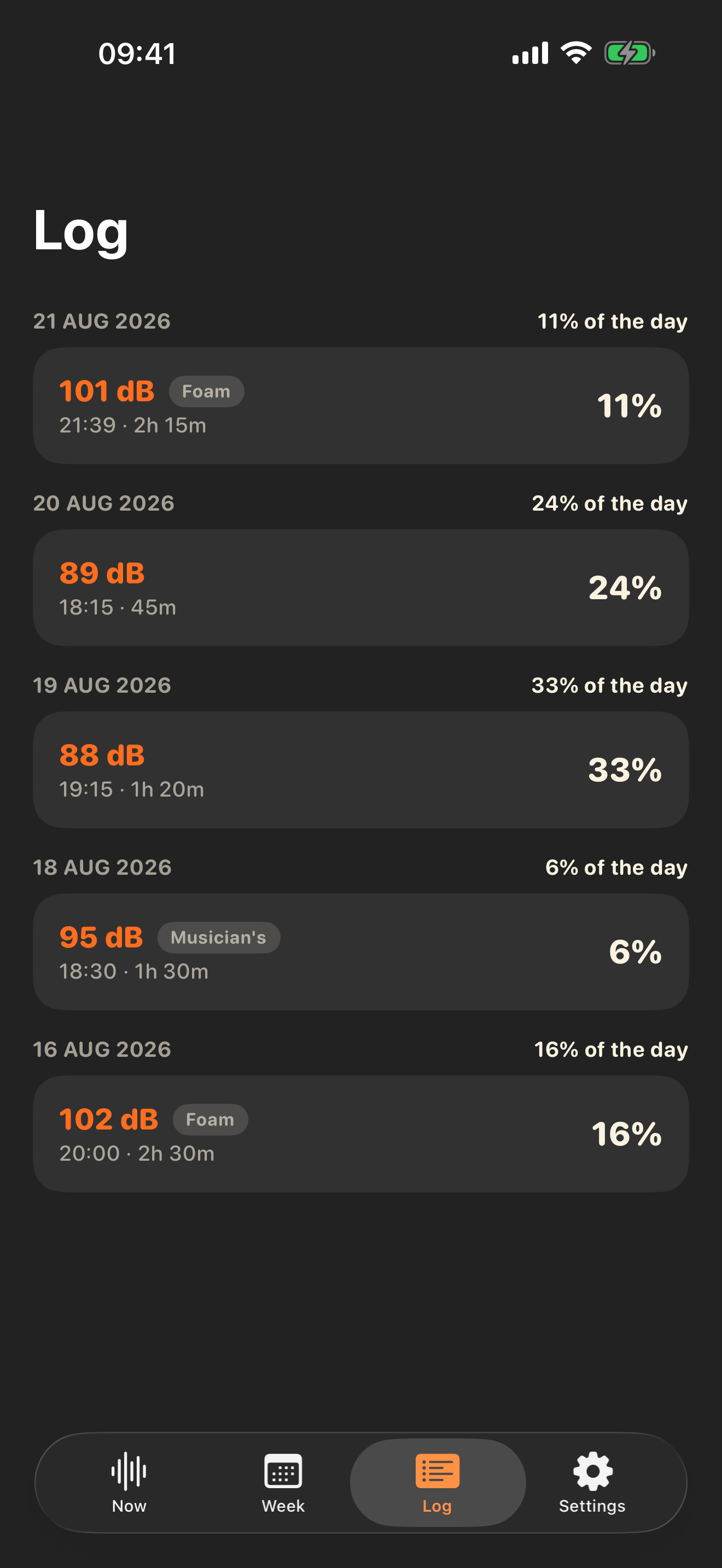
Every session by day: the level, the duration, what was in your ears, and the share of that day's budget it cost. Name the night when you leave - Gig, Club, Bar, Cinema, Work, or anything you type - and the column of percentages becomes a record of where you were. Labelling is free; the free app keeps seven days of history, Din Pro keeps all of it.
A Live Activity carries the time you have left to the Lock Screen and the Dynamic Island, so the phone stays in your pocket at the gig and checking your ears does not mean unlocking anything.
A notification before the day's budget runs out, so plugs go in while they can still make a difference. Time-sensitive, so it reaches you through a Focus; scheduled locally on your phone.
Start and end a session from Siri, a shortcut or an automation - arriving at a venue can start one without you opening anything, and without Din itself ever touching your location. Both open the app on purpose: the meter only listens on screen, and Din will not claim to measure a room it is not looking at. Asking how long your ears have got is answered without opening the app at all, and that one is Pro - it is the widgets' data by another door.
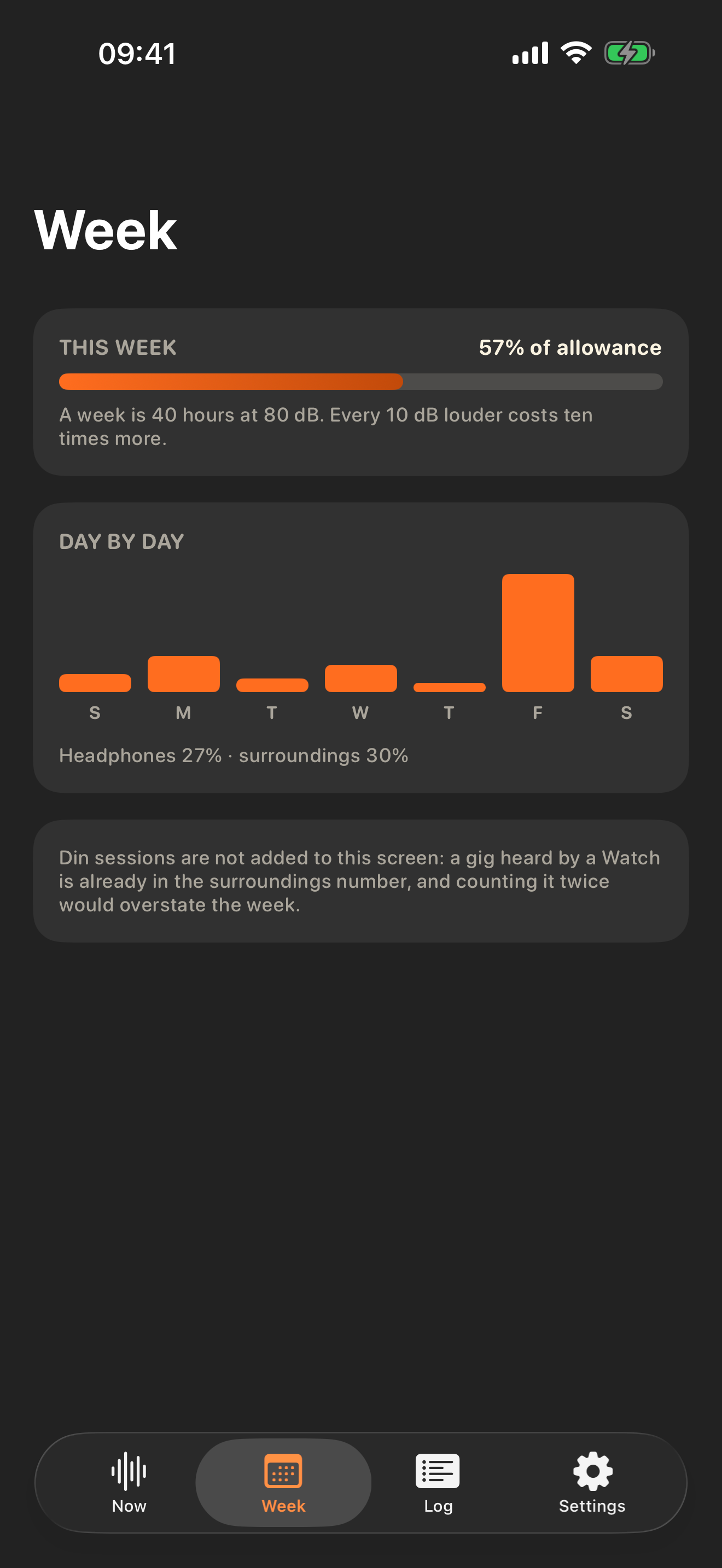
Your iPhone already records headphone listening, and an Apple Watch records the noise around you. Din reads both from Health and sums them against the weekly allowance, day by day. Widgets keep the budget in sight in four sizes - the share left on the Home Screen, a wider one carrying the live countdown and what is in your ears, and two more for the Lock Screen.
The numbers come from published limits.
Nothing in Din is a house formula. The daily budget is NIOSH's recommended exposure limit, the weekly allowance is the WHO's, and the two places that involve judgement - what plugs are worth, and what a phone microphone can be trusted to hear - are deliberately cautious.
A day's ears are eight hours at 85 dB, and every 3 dB louder halves the time: an hour at 94, fifteen minutes at 100. Under 80 dB nothing accrues - the quiet parts of the day are free.
The Week screen sums your exposure against 40 hours at 80 dB - the same allowance Apple's own headphone notifications are built on, which is why reading Health's records against it is honest.
Packet ratings are laboratory numbers; plugs worn by a real person at a real gig deliver less. Din counts musician's plugs at 15 dB and foam at 20, well under their packets, so the countdown errs on the side of the ears.
A phone microphone is not a certified meter, and the dial says "estimate" on it. If you have a reference meter, match Din to it in Settings; above 110 dB, where phone microphones stop measuring and start limiting, Din says "over" rather than guessing.
The meter listens only while the app is open. A session does not follow you around recording: it holds the level you measured and models the dose forward, exactly as stated, until you re-measure or leave - which is why there is no microphone running in your pocket and no battery drain at the gig.
The app, on an iPhone.
Din is iPhone-only, in portrait, drawn in four colours: silk for the ink, flame and ember for loudness, carbon for the page - shown here in the dark appearance it mostly wears, because venues are dark. The frames are a pinned Saturday night.
Free covers the night out.
The free app is the whole loop: the planner, the meter, the safe-time table, a session with its countdown, and a week of history. Din Pro adds the parts that keep working while your phone is locked, the longer view, and the earplugs you own.
Everything you need to get through tonight with your ears intact, with nothing held back mid-session. Safety is never paid.
- The live meter, with its bands and captions
- How long you have - unprotected, musician's plugs, foam - against the day's budget
- Before you go: what a night would cost, planned from the sofa
- Sessions with the countdown, the ring, re-measuring and protection changes
- Naming your nights, and what the app says once the allowance is spent
- Starting and ending a session from Siri or a shortcut
- Works with the microphone denied - sessions start from typical-venue estimates
- Seven days of history in the log
A subscription or a one-time purchase, whichever suits. The yearly plan starts with a seven-day free trial.
- Live Activity: the countdown on your Lock Screen and in the Dynamic Island
- Ten minutes' warning before the budget runs out, delivered through a Focus
- The earplugs you own, by the rating on the packet, derated the way Din derates its own
- The Week: headphone and environmental exposure from Health, against the weekly allowance
- Your full session history
- Home Screen and Lock Screen widgets, in four sizes
- Asking how long your ears have got without opening the app
An app that listens to the room around you has an obligation to prove it keeps nothing. Din's proof is structural: there is no network code in the app at all.
No account, no ads, no analytics - and no internet. Din makes no network connections. Nothing you do in it can leave the phone, because there is nothing in the app that sends.
The microphone becomes a number and nothing more. Sound is turned into a level and thrown away, only while the app is open. No audio is ever recorded or stored, and the mic indicator goes out when your phone locks.
Health access is optional and read-only. The Week screen reads your headphone and environmental sound levels to draw its bars. Din writes nothing to Health, and works fully without it.
Your sessions stay on your iPhone. Every night you log lives in the app's own database on your device. Delete one with a long press, or all of them by deleting the app.